Showing posts with label work flow. Show all posts

Thursday, October 29, 2009

HdR Photography with Effects


(click image for larger view)

I was in Knoxville, TN last weekend soaking up lumen into my color filter array by way of bracketing on a tripod resulting in high dynamic range imagery which processed with computer code that combined the data from multiple captured photodiodes.

The word "com-put-er" above totally lost its futuristic linguistic implication in the past ten years. I can't say computer and feel awesome anymore. What's a new word that is cool now? OH OH!! iPhone. No, that's not even cool anymore. Hooooow abooout ANDRIOD! It's making a comeback in the cell phone/operating system word. Make's me think of DANGER, WIL ROBINSON!

OH CRAP. This is my photography blog. I probably should say something about photography.

Ok. So, this image I shot above was 3 total images shot using a tripod. I set my camera on burst mode and set bracketing to +/-2 stops. I then put on the camera's self timer.

Depress the shutter and ten seconds later the camera will automatically shoot three images, all with different shutter speeds. That's it. Well, for the field anyway.

Once in post I used the popular HdR software Photomatix (which I always mess up saying it as PhotoMATRIX..hey, I liked that movie!) From the HdR software I export as a 16-BIT TIFF and then open the TIFF in Photoshop. If you haven't heard of Photoshop...you may be a total idiot. Seriously, my first word as a child was "fothostot." I know, I was SO close even then!

ANYWAY, moving on...

In Photoshop I used two different soft-light layers of images of metal I found laying around. Then, I added an intense frame I had in a frame library. (not sure the name of it, sorry) You almost can't go wrong with insane borders; it really gets the attention off any mistakes made in the photography. ;D

Friday, September 19, 2008

Digital Camera's in the Future


I was over on Model Mayhem tonight and there was a good topic started titled "The next big photographic movement." I was feeling my brain juices moving around and decided to start throwing ideas on the table. Enjoy!

• HDR capture. Exposure established in post [ARTFORM's made this one up]
Solid state hard drive IN the camera. (drives made, not in caeras yet)
• built in Wi-Fi to transfer images to anywhere you want (already made, not built in)
• multi lens to capture full Depth of Field, choose DoP in post (already made)
• retouching tools in-camera
• auto tagging a persons name, gender, hair color, eye color, etc.. to meta data by facial/feature recognition (already being used in software..not in camera yet)
Retina scan of photographer shooting the image and auto-tagging the metadata with the photographers information (personal and business)
• [b]since our future camera has Wi-Fi..whatever info the retina scan takes from the photographers eye shooting the image automatically transfers a thumbnail of the image and the photographers information to the Orphan Works Database[/b]
• the ability to auto configure strobe power by noting their distance from the subject...of course programmable modes and "auto" modes for different automatic light ratios (the subject would only need to wear a pin-head sized chip to get that working) Even busy mom can nail lighting ratios at home! Yaay!

If you have any fun ideas to share, comment away!

Wednesday, September 17, 2008

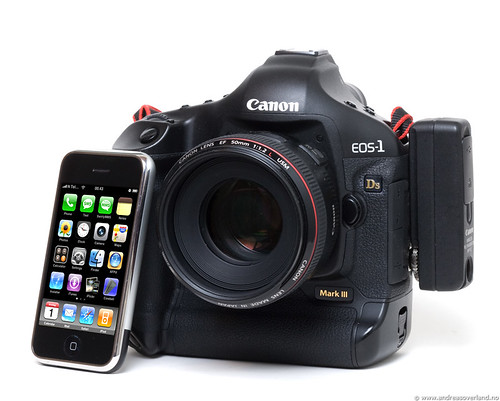
Canon and iPhone ...together.


If you are like anyone else who has messed with someone elses iPhone for an evening it's hard not to go out and buy one. It's a killer device.

If you shoot Canon and have an iPhone, your cell phone just became your cameras new best friend. Well, that is because the sexiness of the Canon:WFT-E2 wireless device became involved. If you don't know, Canon's wireless device (WFT-E2) attachs to your camera and allows transmission of images from the camera directly to another wireless device, like a laptop, NAS storage device (Drobo anyone?!), or you guessed it, the iPhone. With NAS and Drobo you would have to be shooting in the range of those devices, like a studio. But, with an iPhone this opens up to being able to shoot on location while transfering your images to your iPhone as you shoot them.

Friday, August 15, 2008

Digital Workflow


I get many e-mails about digital work flow. Some e-mails are asking me to give a work flow for they can get started, others ask for an evaluation to see if something can be done better.

I'm not sure if anyone noticed, but my work flow evolves and changes over time and my work flow doesn't work for everyone else. Nor can it. But, it's not a bad idea to listen to other's work flow. You can always find a gem.

There is not any one way a work flow can be done to suit everyone. There are too many variables that make each person’s work flow a little bit different than the next persons. Also, a work flow isn't set in stone. Because of variables the work flow system evolves. What variables you might ask? Here is a list to get you started:

• file sizes
• file types
• color spaces
• for print or for web, or both
• average frames per-shoot
• how often do you have sessions
• computer speed
• JPG (please no!) or RAW?
• Converting to DGN?
• storage capabilities
• seasonal or full time shooter
• time it takes to retouch
• what level of retouching needs to be done
• single user or multiple users
• MAC or Windows or Linux
• what software is being used
• work in one location, or many
• how many files do the customer see compared to how many you shoot
• how quick do the clients need to see their images

As you can see there is a lot that can make a work flow different and a lot that can make it change. Over the years I have come to realize the quantity of images is a good place to start on work flow. Most shooters that shoot 500-1000+ images per shoot will have a similar work flow. Not the same, but similar. Those shooters only shooting 60 images a session won't have to have such an extensive work flow. Also, depending on if you are a jpeg (shame on you!) or raw shooter, your work flow will be different.

Speaking of raw shooting, did you know that if you are in JPG mode your camera is still shooting a raw file then converting it to a JPG? Why waste that time and battery power in file converting inside the camera?! Why waste 4 to 6 bits per pixel of data when it's going to capture it anyhow?!

Above is Roberta. She always has a killer swimsuit to show off. This is the only shot I took of her on the beach, my camera broke immediately afterward. It's currently on its way to the company for repair.

Comment if you have work flow questions.